
Proxy for AI Agents: Network Proxies, LLM Gateways, and MCP Gateways Explained
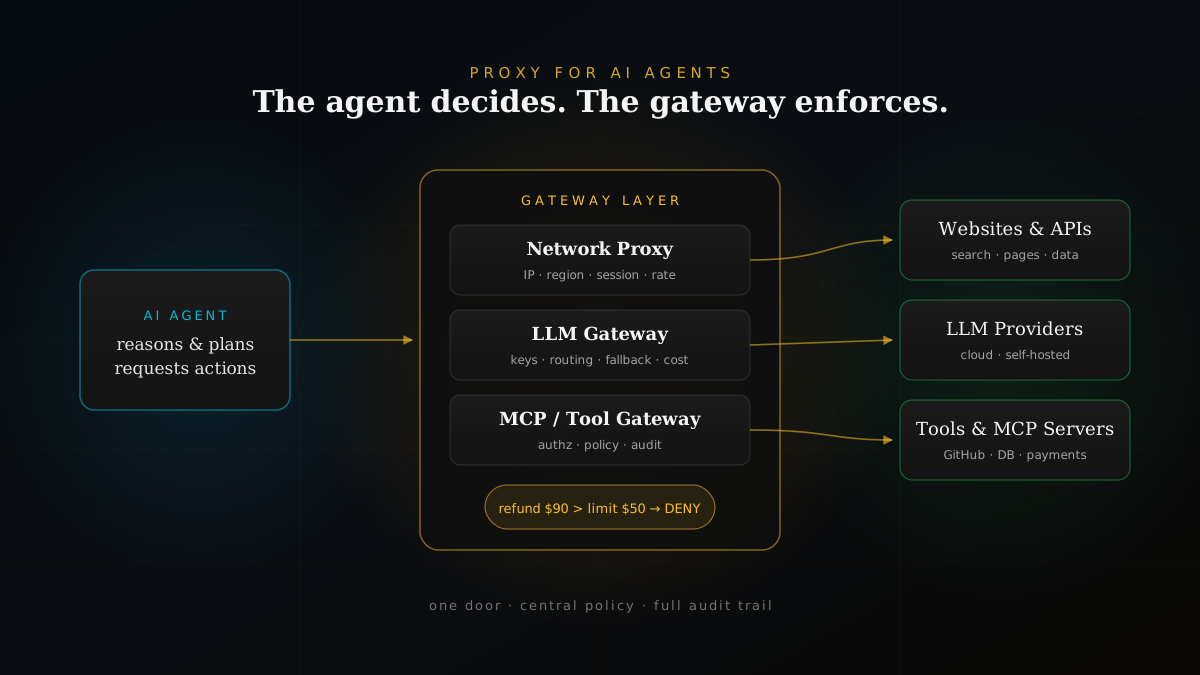
The agent decides. The gateway enforces.
Quick Answer
A proxy for AI agents is an intermediary that sits between an AI agent and everything it reaches — websites, APIs, language models, and tools. It forwards the agent's requests and applies control along the way.
- Network proxy — controls how the agent reaches the web (IP, region, session, rate limits).
- LLM proxy / AI gateway — controls how the agent reaches models (one API, keys, routing, fallback, cost).
- MCP / tool gateway — controls which tools the agent can use and with what arguments (authorization, policy, audit).
Picture an AI agent with access to your GitHub organization, your production database, your payment system, a handful of MCP tools, and three different language model providers. A customer asks for a refund. The agent decides to issue a $90 refund. Its limit is $50.
Who stops it?
Not the model. The model already decided the refund was reasonable. Something between the agent and the payment system has to check the request against policy and say no. That "something in between" is what people mean when they talk about a proxy for AI agents — and it turns out to be one of the most important pieces of production agent architecture.
What Is a Proxy?
A proxy is an intermediary server between your application and the destination it wants to reach. Instead of connecting directly, your request goes to the proxy, which forwards it and returns the response. MDN Web Docs defines a proxy server as an intermediary that intercepts requests, forwards them, and returns responses; Microsoft Learn describes it as a component that sits between a client and a destination server, mediating communication on behalf of one side.
Without a proxy:   Application ───────────────→ Destination

With a proxy:      Application ──→ Proxy ──→ Destination
                                    │
                         route · inspect · log · enforce
The destination usually sees the proxy's IP address rather than yours. MDN distinguishes two broad shapes: a forward proxy acts on behalf of clients reaching out to the internet, while a reverse proxy or gateway sits in front of servers and handles traffic coming in. Most proxies for AI agents are forward proxies — they sit on the agent's side and govern what goes out.
Why AI Agents Change the Proxy Problem
A traditional application makes predictable requests. A developer wrote the code, so you know which endpoints it calls, with which parameters, in which order.
An AI agent is different. It decides at runtime which website to open, which model to call, which tool to invoke, and what arguments to pass — and those arguments are generated by a language model. The set of possible requests is no longer fixed in code.
AI agent → Proxy → Website / API / LLM provider / Tool
That shifts the job of the proxy. For a normal app, a proxy is mostly about networking. For an agent, the proxy layer becomes the natural place to answer harder questions: Which model should serve this request? Is this tool call allowed? Does this argument exceed a limit? Should a human approve it first?
The agent should not be the final authority on what it is allowed to do.
In practice, "proxy for AI agents" covers a few distinct layers. Two of them come up most often — the network proxy and the LLM proxy — and a third, the tool or MCP gateway, is quickly becoming just as important.
1. Network Proxy for AI Agents
A network proxy controls an agent's access to the internet. When a research or browsing agent fetches pages, calls public APIs, or runs a headless browser, its HTTP traffic can be routed through a proxy rather than going out directly from your infrastructure.
What a network proxy is useful for
- Controlled egress — route browser or HTTP requests through known IPs so security teams can allow-list and monitor them.
- Session consistency — keep the same IP across a multi-step browsing task so the site sees one coherent session.
- Location-specific results — select a country or region when an agent needs localized search results, prices, or content.
- Traffic management — spread and pace requests to stay within rate limits instead of hammering one endpoint.
- Infrastructure separation — keep the agent's internal servers separate from public-facing requests.
This is the use case most commercial "AI proxy" providers focus on. Many offer residential proxy networks that pool tens of millions of IP addresses across countries so agents can browse without being throttled. Large IP pools like this are why browsing agents can gather location-aware data at scale — and also why they must be used responsibly.
Example: routing an agent's HTTP requests through a proxy
import os
import requests

PROXY_URL = os.environ["AGENT_PROXY_URL"]  # http://user:pass@proxy.example.com:8000

proxies = {
    "http": PROXY_URL,
    "https": PROXY_URL,
}

response = requests.get(
    "https://example.com",
    proxies=proxies,
    timeout=20,
)
Keep proxy credentials in environment variables or a secrets manager rather than in code. And remember the limits of this layer:
A network proxy only changes the network path. It does not make the agent intelligent, browse pages, click buttons, or extract structured data by itself.
Browsing and extraction are the job of the browser automation layer or a search API. Choosing between those options is a separate decision — and for many workloads an official search or data API is simpler and more reliable than browsing at all.
2. LLM Proxy, AI Gateway, or LLM Gateway
The second meaning of "proxy for AI agents" has nothing to do with IP addresses. An LLM proxy — also called an AI gateway or LLM gateway — sits between your agent and model providers such as OpenAI-compatible APIs, Anthropic, or self-hosted models.
AI agent → LLM gateway → Model provider A
                      ├──→ Model provider B
                      └──→ Self-hosted model
Instead of every agent holding its own API keys and calling providers directly, all model traffic flows through one endpoint:
http://llm-gateway/v1/chat/completions
What an LLM gateway centralizes
- One unified API for multiple LLM providers, so agents are not coupled to a single vendor SDK.
- Credential management — provider API keys live in the gateway, not in every agent.
- Model routing — send a simple classification to a fast, inexpensive model and a complex reasoning step to a more capable one.
- Fallback and failover — if a provider is down or rate-limited, retry on another.
- Rate limits, quotas, and budgets per team, agent, or user.
- Cost tracking — token usage attributed to the agent and workflow that caused it.
- Logging and observability for every prompt and response.
- Policy checks — redact sensitive data in prompts or block disallowed outputs.
- Cloud and local switching — move a workload between hosted and self-hosted models without changing agent code.
At the infrastructure level, projects such as llm-d document the same pattern for self-hosted inference: the proxy accepts an inference request, selects an appropriate model server, routes the request, and streams the response back.
Example: pointing an agent at an LLM gateway
import os
from openai import OpenAI

# The agent talks to the gateway, not the provider.
# Provider keys, routing, and budgets live in the gateway.
client = OpenAI(
    base_url="http://llm-gateway/v1",
    api_key=os.environ["GATEWAY_TOKEN"],
)

reply = client.chat.completions.create(
    model="research-default",  # a gateway alias, not a vendor model id
    messages=[{"role": "user", "content": "Summarize this filing."}],
)
Using a gateway alias such as research-default lets the platform team change the underlying model, add fallback, or move to a cheaper provider without touching agent code.
3. MCP and Tool Gateways: Where Policy Gets Real
Models produce text. Agents become dangerous — and useful — when they call tools: create a pull request, run a SQL query, issue a refund, send an email. Increasingly those tools are exposed through the Model Context Protocol (MCP).
Here is the trap: having a tool does not mean every action with that tool is allowed. An agent with a payments tool can technically refund any amount. An agent with database access can technically run DELETE. The tool definition describes what is possible, not what is permitted.
The $90 refund problem
Agent:    refund(order_id="A-1042", amount=90)
             ↓
Gateway:  policy → max_refund = 50
             ↓
Result:   DENIED — exceeds limit, escalated for human approval
An MCP gateway (or tool gateway) sits between agents and tool servers. It authenticates the agent, checks whether that agent may use the tool at all, inspects the arguments against policy, and records what happened. The open-source agentgateway project describes itself as an AI-native proxy for agent-to-LLM, agent-to-tool, and agent-to-agent communication, sitting between agents and MCP servers, A2A agents, or HTTP services to provide security, observability, governance, routing, and failover. Gravitee Agent Management takes a similar approach with separate LLM, MCP, and A2A proxies for model traffic, tool calls, and agent-to-agent delegation.
The agent decides. The gateway enforces.
This is the core architectural principle. Reasoning and authorization are separated. The model can propose anything; only requests that pass policy actually execute. It is the same idea we describe in our guide to AI agent harnesses: permissions belong to the system around the model, not to the model itself.
Watch: How AI Agent Proxies Actually Work
We walk through this whole picture — from basic network proxies to LLM gateways, MCP tools, and the $90 refund problem — in a short video:

6:52 · Chapters: what a proxy is · network proxy vs AI gateway · LLM gateways · the $90 refund problem · centralized gateway trade-offs · real gateway architecture
Proxy vs Gateway vs Agent: Who Does What?
These terms get blurred together. A clean separation of responsibilities makes agent systems far easier to reason about:
| Component | Main purpose | Controls |
|---|---|---|
| Network proxy | How the agent reaches websites and APIs | IP, region, session, rate |
| LLM proxy / AI gateway | How the agent reaches language models | Keys, routing, fallback, cost |
| MCP / tool gateway | Which tools the agent can use, and how | AuthZ, argument policy, audit |
| A2A proxy | How agents delegate to other agents | Identity, scope, delegation |
| Browser automation layer | Opens pages, clicks, types, keeps state | Rendering, DOM, cookies |
| AI agent | Decides what to do and in what order | Reasoning, planning |
The agent decides what to do. The browser or API client performs the action. The network proxy controls the connection. The LLM gateway controls access to models. The tool gateway controls what actions are permitted.
Why Centralized Gateways Matter
Think of the gateway as one door. Every request from every agent — to a model, a tool, or the web — passes through it. That single choke point is what makes governance possible:
- One place to define and update policy for every agent
- One place to store and rotate credentials
- One audit trail showing what each agent requested and what was allowed
- One view of cost, latency, and error rates across providers
- One switch to cut off a misbehaving agent instantly
Without a gateway, each agent embeds its own keys, its own retry logic, and its own idea of what it is allowed to do. That works for a demo. It does not survive an organization running dozens of agents.
The Gateway Trade-off
A single door is also a single point of pressure. Centralization brings real costs:
- Single point of failure — if the gateway goes down, every agent goes down. Run it highly available.
- Added latency — every call takes an extra hop. Keep policy evaluation fast and streaming paths lean.
- High-value target — the gateway holds provider keys and sees every prompt. Lock down who can reach and configure it.
- Policy drift — rules that are too loose let bad actions through; rules that are too strict break legitimate workflows. Version and test policy like code.
Security: Proxies Are Not a Bypass Tool
A proxy should never be treated as a way to get around authentication, access restrictions, or a website's terms of service. In production it is better viewed as a controlled infrastructure and security layer. Responsible agent browsing respects robots.txt, terms of use, rate limits, and login walls.
The security picture also runs the other way. Check Point Research has shown how web-based AI services with browsing features can be abused as command-and-control relays — attackers hide malicious traffic inside requests that look like ordinary AI usage. For defenders, that is a strong argument for routing all agent and AI traffic through governed gateways with egress allow-lists, identity, and monitoring, rather than letting agents connect anywhere they like.
Practical security checklist for an AI agent proxy layer:
- Authenticate every agent to the gateway with its own identity
- Grant least-privilege tool access per agent, not per platform
- Validate tool arguments against policy before execution
- Require human approval for high-impact or irreversible actions
- Restrict outbound destinations with allow-lists where possible
- Redact secrets and personal data before they reach model providers
- Log every request and decision for audit and incident response
A Practical Proxy Architecture for AI Agents
For a production AI research or operations agent, a robust design looks like this:
User
  ↓
Agent orchestrator
  ↓
Policy / tool gateway ──→ MCP servers, internal APIs, payments
  ↓
Network proxy ─────────→ Search APIs, websites
  ↓
LLM gateway ───────────→ Selected language model
  ↓
Observability (traces, cost, audit log)
Not every agent needs every layer on day one. A single internal agent calling one model may only need an LLM gateway for keys and cost tracking. A browsing agent adds a network proxy. An agent that can change real systems — code, data, money — needs a tool gateway with policy before it goes anywhere near production. And once the gateway is in place, its traces become the backbone of AI observability for production teams.
How to Choose a Proxy for Your AI Agent
- Start with what the agent touches. Web pages? Models? Internal tools? Each needs a different layer.
- For web access, prefer official APIs first; add a network proxy when you need controlled egress, regional results, or session consistency.
- For model access, put an LLM gateway in front of all providers as soon as more than one agent or one provider is involved.
- For tools, define policy per tool and per argument — limits, allowed resources, approval thresholds — and enforce it in a gateway.
- Plan for failure. High availability, fallback models, timeouts, and a kill switch.
- Measure everything. Latency added, requests denied, cost per workflow, and policy hits tell you whether the layer is working.
Final Takeaway
"Proxy for AI agents" sounds like a networking detail. It is really a question about control: how does an autonomous system reach the outside world, and who decides what it is allowed to do when it gets there?
The network proxy governs the connection. The LLM gateway governs the models. The tool gateway governs the actions. And across all three, one principle holds:
AGENT DECIDES → GATEWAY ENFORCES → SYSTEM ACTS
Get that separation right, and the $90 refund never happens — no matter how confident the model was.
Frequently Asked Questions
What is a proxy for AI agents?
A proxy for AI agents is an intermediary that sits between an AI agent and the systems it reaches — websites, APIs, language model providers, or tools. Instead of connecting directly, the agent sends requests through the proxy, which forwards them, returns the response, and can apply routing, authentication, rate limits, logging, and policy along the way.
What is the difference between a network proxy and an LLM proxy?
A network proxy controls how an agent reaches websites and APIs: which IP address and region it appears from, session persistence, and request rate. An LLM proxy (also called an AI gateway or LLM gateway) controls how an application reaches language models: one unified API across providers, credential management, model routing and fallback, quotas, cost tracking, and prompt or response policy checks.
What is an LLM gateway or AI gateway?
An LLM gateway is a proxy dedicated to model traffic. Your agent calls a single endpoint such as /v1/chat/completions, and the gateway decides which provider or self-hosted model serves the request, injects the right API key, enforces rate limits and budgets, logs the call, and fails over to another model if one is unavailable.
What is an MCP gateway?
An MCP gateway sits between AI agents and Model Context Protocol servers. It exposes approved tools to agents, authenticates and authorizes each tool call, applies policy to arguments (for example refund limits or allowed repositories), and records an audit trail. Projects such as agentgateway and platforms such as Gravitee Agent Management provide this layer alongside LLM and agent-to-agent (A2A) proxies.
Does a proxy make an AI agent smarter?
No. A proxy only changes the network path and the controls applied to it. It does not browse pages, click buttons, extract structured data, or decide what to do next. The agent decides; the browser or API client performs the action; the proxy controls the connection; the gateway enforces policy.
Why do AI agents need a different kind of proxy than normal apps?
Traditional applications make predictable, pre-programmed requests. AI agents decide at runtime which websites, models, and tools to call, with arguments generated by a model. That makes the proxy layer more than a router — it becomes the place to enforce what an agent is allowed to do, because the agent itself should not be the final authority on its own permissions.
What is the "agent decides, gateway enforces" principle?
It means separating reasoning from authorization. The agent can propose any action — for example a $90 refund — but the gateway checks that action against policy, such as a $50 refund limit, before anything executes. If the request violates policy it is denied or escalated for human approval, regardless of how confident the model was.
Should I use a residential proxy for my AI agent?
Residential and datacenter proxy networks are commonly used for location-specific search results, consistent sessions during multi-step browsing, and spreading request load. Use them only for legitimate access: respect robots.txt, website terms, authentication, and rate limits. A proxy should never be used to bypass access controls, and many workloads are better served by official search or data APIs.
What are the risks of a centralized AI gateway?
A single gateway gives you one place to enforce policy, manage credentials, track cost, and audit behavior — but it also becomes a single point of failure, a latency hop, and a high-value target. Mitigate this with high availability, low-overhead routing, strict access control on the gateway itself, and careful handling of the prompts and secrets that pass through it.
Can attackers abuse AI services as proxies?
Yes. Check Point Research has shown how web-based AI services with browsing capabilities can be turned into command-and-control relays, hiding malicious traffic inside legitimate-looking AI requests. This is one reason enterprises route agent and AI traffic through governed gateways with egress controls, monitoring, and allow-lists rather than letting agents connect anywhere.
How do I add a proxy to a Python AI agent?
For network traffic, pass a proxies dictionary to your HTTP client — for example requests.get(url, proxies={"https": "http://user:pass@proxy:8000"}). For model traffic, point your SDK base URL at your LLM gateway instead of the provider, so every call flows through one governed endpoint. Keep proxy credentials in environment variables or a secrets manager, never in source code.
Govern Your Agents
Agents should decide. Your infrastructure should enforce.
At Invisigent, we help teams design LLM gateways, MCP tool gateways, and policy layers that give production AI agents the access they need — and nothing they shouldn't have.
Talk to Us About Your Agent Gateway →