
AI Agent Harness: What It Is, How It Works, and Why It Matters for Production AI
The model reasons. The harness turns that reasoning into controlled, repeatable work.
AI agents are often described as if the model is doing everything. Give an AI agent a task, and it can search the web, read documents, write code, call APIs, update databases, run tests, remember previous work, and sometimes even delegate tasks to other agents.
It is tempting to look at all of this and think:
The model has become that capable.
But that explanation misses an important part of the architecture.
A language model can reason about an action, but reasoning about an action is not the same thing as actually performing it. A model can generate a tool call. Something else has to execute that call. A model can decide that it needs a file. Something else has to retrieve that file. A model can propose a code change. Something has to apply it, run the tests, collect the results, and give those results back to the model.
That surrounding system is where the idea of an AI agent harness comes in.
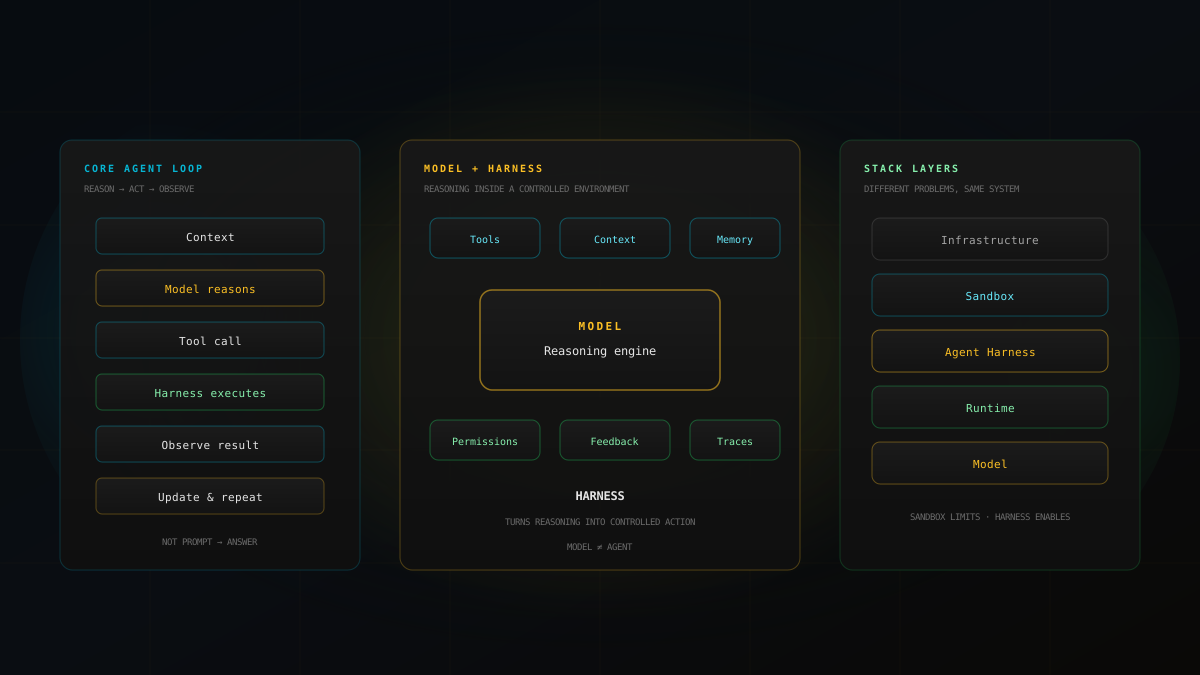
Agent = Model + Harness
LangChain uses this framing to describe the harness as the code, configuration, and execution logic surrounding the model, while Martin Fowler uses "harness" as a broad term for the parts of an agent other than the model itself. The exact boundary varies between implementations, but the underlying idea is remarkably consistent:
The model provides reasoning capability. The harness gives that reasoning an environment in which it can become useful work.
What Is an AI Agent Harness?
An AI agent harness is the software and system layer surrounding a model that manages the information, tools, state, execution, permissions, and feedback needed for the model to complete a task.
Microsoft describes an agent harness as runtime scaffolding that drives model and tool calls, manages conversation state and context, applies approval policies, and can keep an agent progressing through a multi-step task. LangChain takes a broader view: if the model is excluded, the remaining code, configuration, tools, infrastructure, orchestration logic, and deterministic hooks can be considered part of the harness. Databricks similarly describes the model as the reasoning component and the harness as the surrounding system that provides tools, memory, workspace, guardrails, and other capabilities required for reliable operation.
There is therefore no single universal checklist that defines every harness. A coding agent, a customer-support agent, and a research agent may have very different harnesses. But they tend to solve the same fundamental problem:
How do we turn model output into controlled, repeatable action?
Why Isn't the Model Enough?
Consider a simple request:
Find the authentication bug in this application, fix it, and verify that the tests pass.
A language model can reason about the problem. It might know what authentication bugs commonly look like. It might even produce a plausible patch. But by itself, a model doesn't automatically have access to your repository, filesystem, database, production APIs, browser, terminal, test runner, application logs, or internal documentation.
A raw model fundamentally operates on the inputs provided to it and produces outputs. It doesn't spontaneously reach into your computer and change a file. LangChain highlights several capabilities that a model does not provide on its own, including durable state, code execution, real-time knowledge access, and environment setup. MindStudio makes the same distinction: the model can generate text and reason about a problem, but it cannot independently open a file, execute a terminal command, send an email, or verify whether CI passed.
That is the gap the harness fills.
Think of the Model as the Reasoning Engine
Imagine giving a highly capable engineer a problem but putting them in an empty room. They can think, plan, and explain what should happen. But without source code, documentation, a terminal, a database, a testing environment, or company policies, their ability to complete the job is severely limited.
Now give that engineer a computer, repository access, documentation, a terminal, testing tools, relevant APIs, project rules, a workspace, permissions, and feedback when something fails. The engineer hasn't suddenly become more intelligent.
The environment around them has become more useful.
That is roughly the role of an agent harness. The model remains the reasoning engine. The harness provides the environment in which that reasoning can operate.
The Core Agent Loop
One of the easiest ways to understand a harness is to follow a single agent action. Suppose a coding agent receives: "Fix the login bug."
User request
     ↓
Model receives context
     ↓
Model decides what to do
     ↓
Tool call
     ↓
Harness executes the tool
     ↓
Result comes back
     ↓
Model observes the result
     ↓
Model decides what to do next
     ↓
...
Databricks describes this as a reason → act → observe → repeat cycle. MindStudio describes a similar loop: the harness sends context to the model, receives the response, determines whether a tool should be called, executes it, adds the result back to context, and continues until a stopping condition is reached.
This is important because the agent isn't simply Prompt → Answer. It is closer to:
Context → Reason → Act → Observe → Update context → Reason again
The harness is deeply involved in that loop.
What Actually Lives Inside an Agent Harness?
Different systems draw the boundary differently, but several components appear repeatedly across the literature and implementations.
1. Tools
Tools are one of the most visible parts of a harness. The model might decide it needs to inspect a database, search the web, or modify a file. The harness exposes those capabilities, receives structured requests, and decides whether and how they should be executed.
Parallel describes the tool integration layer as the mechanism connecting a model to external tools and APIs. MindStudio describes the same basic mechanism: define available tools, present them to the model, receive tool calls, execute the underlying functions, and return results.
The model can request an action. The harness can perform and control that action.
2. Context Management
Giving an agent access to information doesn't mean giving it everything. Dumping every document, tool result, conversation message, and database record into every model call can make the system worse. The harness therefore manages which instructions, files, previous actions, tool results, summaries, and retrieved information should be present for a given step.
Parallel describes this as context engineering, including isolation, reduction, and retrieval. Databricks describes context compaction: as a task becomes longer, the system can summarize or trim older information so the model isn't overwhelmed.
More context is not automatically better context.
3. Memory and State
What happens when a task lasts longer than one conversation, the context window fills up, or the agent needs to resume work tomorrow? The harness can provide persistence. Databricks describes filesystem and durable storage as a way for agents to preserve code, notes, plans, intermediate work, and progress across sessions. Parallel similarly separates working context, session state, and long-term memory.
Monday: Agent investigates payment failures
        Stores files, hypotheses, tests, unresolved issues

Tuesday: Agent resumes
         Loads relevant state
         Continues investigation
Without this layer, the agent may repeatedly rediscover the same information. With it, the system can maintain continuity.
4. Workspace and Execution Environment
An agent needs somewhere to work. For a coding agent that might be a repository, filesystem, terminal, container, sandbox, dependencies, build tools, and test runners. For a research agent it might be a document workspace, search services, databases, browser access, and structured notes.
LangChain specifically identifies filesystem access, sandboxing, browsers, logs, screenshots, and test runners as important primitives. Saying an agent "writes code" can be misleading: the model generates the proposed change; the harness provides the environment in which that change can actually be applied and tested.
5. Guardrails and Permissions
This is where the harness becomes particularly important for production systems. Should an agent with database access read every record, modify customer information, delete records, issue refunds, send emails, or deploy code? These capabilities shouldn't all be treated equally.
MindStudio gives a simple example: a coding agent might be permitted to read and write within a project directory while being blocked from arbitrary shell operations; a customer-support agent might retrieve order information but require additional controls before issuing large refunds. Databricks describes permissions, policies, approvals, monitoring, and human-in-the-loop checkpoints as harness-level controls.
The model should not be the final authority on what it is allowed to do.
Harness vs Sandbox: They Are Not the Same Thing
A sandbox is primarily about limiting the damage an agent can cause. A harness is primarily about helping the agent perform its task effectively and controllably.
Red Hat's proposed architecture separates:
Infrastructure
      ↓
Sandbox
      ↓
Agent Harness
      ↓
Runtime
      ↓
Model
The sandbox answers: "What is the agent allowed to touch?" The harness answers more like: "What does the agent need to do the job well?" Red Hat characterizes sandboxing as a subtractive control and harness engineering as more additive. Bright Data makes a similar distinction between infrastructure, sandbox, harness, and runtime. These layers work together, but they solve different problems.
Harness vs Runtime
The terms are sometimes used interchangeably. They don't always mean exactly the same thing. Red Hat argues for a distinction in which the runtime drives the agent loop, while the harness is the enablement layer around it. Bright Data similarly describes the runtime as the execution engine that takes model output, executes tool calls, collects results, and feeds updated context back into the model.
Microsoft's implementation shows how closely these pieces can be composed: its harness combines a chat client, pipeline, context providers, middleware, approvals, observability, looping, and user-facing interaction. Rather than obsessing over one universal definition, ask:
Which component is executing the loop, and which components are being deliberately engineered to make that loop effective and safe?
The Most Important Part: Feedback
Giving an agent tools is not enough. The agent also needs to know whether its actions worked.
Without verification:
Model → Edit code → "Done."

With feedback:
Model → Edit code → Run tests → Fail → Analyze → Fix → Retest → Pass
Databricks identifies feedback loops and self-verification as core harness capabilities. Martin Fowler takes this further with feedforward and feedback controls.
Feedforward controls guide the model before it acts: coding conventions, system instructions, project documentation, AGENTS.md, skills, and architectural rules. Their purpose is to reduce the probability of a bad first attempt.
Feedback controls inspect what happened after the model acted: tests, linters, type checkers, logs, static analysis, browser checks, and AI-based code review. Their purpose is to detect problems and provide signals that allow correction.
You need both. Instructions without feedback miss failures; feedback without guidance can mean repeating the same mistakes.
Computational vs Inferential Feedback
Fowler separates harness controls into computational and inferential mechanisms. Computational controls — tests, linters, type checkers, structural analysis — are deterministic or comparatively predictable and can often run quickly and repeatedly. Inferential controls — AI code review, LLM-as-judge evaluation, semantic analysis — capture more nuanced issues but are typically slower, more expensive, and themselves probabilistic.
Agent changes code
       ↓
Unit tests → Type checker → Linter → AI review → Final validation
The point isn't to check everything with another LLM. It is to use the cheapest reliable mechanism that can catch a particular class of error.
Why More Tools Can Make an Agent Worse
It is easy to assume that agent capability increases linearly with the number of tools. It doesn't necessarily. At some point the model has a tool-selection problem: which tool exists, what it does, when to use it, what arguments it needs, what result it returns, and whether another tool would be better.
The better lesson is not "give agents fewer tools." It is: give agents the right tools, with clear interfaces, appropriate permissions, and useful context.
Why the Same Model Can Behave Differently
Imagine two teams use the same underlying model. Team A gives it poor context, vague instructions, dozens of poorly described tools, no persistent state, no tests, no useful feedback, and broad permissions. Team B gives it carefully selected context, structured instructions, a clean tool interface, a persistent workspace, deterministic verification, clear approval boundaries, and strong observability.
The model hasn't changed. The surrounding system has.
Databricks explicitly argues that memory, tool orchestration, feedback loops, and guardrails can substantially affect agent performance. Agent capability should increasingly be considered at the model + harness configuration level rather than attributed to the model alone.
Instead of asking only "Which model are you using?" also ask "What environment is that model operating inside?"
Harness Engineering: Designing the System Around the Model
Once you accept that the surrounding system matters, a new engineering problem appears. You don't just need to build an agent. You need to engineer the harness around it. Martin Fowler describes this as an iterative steering process.
When an agent repeatedly violates a project architecture rule, you can add an explicit architectural guide, a structural test, a linter, a relevant skill, and a review check. Now the system has both a mechanism for preventing the mistake and a mechanism for detecting it if it happens anyway.
Instead of:
Agent fails → Human fixes → Agent fails again → Human fixes again

You want:
Agent fails → Understand why → Improve harness → Failures become less likely
That is the essence of harness engineering.
Context Engineering and Harness Engineering
These concepts overlap, but they are not identical. Prompt engineering asks what you should tell the model. Context engineering asks what information the model should receive at this point. Harness engineering asks how the entire system around the model should operate.
Prompt      → Instructions
Context     → Information
Harness     → Information + Tools + State + Execution
              + Permissions + Feedback + Observability
The distinction is useful because it prevents teams from trying to solve every agent problem by rewriting the prompt. Sometimes the missing test runner, context policy, tool interface, permission model, or observability is the real problem.
Observability: Knowing What the Agent Actually Did
Production agents are difficult to operate if you can only see the final answer. You need to know what context the agent received, which tools it called, what those tools returned, what state changed, which permissions were exercised, where the workflow failed, how long each step took, whether the model retried, and what eventually produced the final result.
Databricks identifies logs, traces, dashboards, and audit trails as important parts of production harnesses. Microsoft's harness architecture also includes observability as a configurable capability. Without this information, an agent becomes a black box.
For a deeper production view of this layer, see our guide on AI observability for production AI teams.
Authentication, State, Guardrails, and Deployment
A production agent has concerns that are easy to forget when building a prototype: who the user is, what they can access, where state is stored, what happens on crashes or tool timeouts, how tool calls are logged, how unauthorized actions are prevented, how harness changes are evaluated, and how multiple agents share infrastructure.
                 Shared Harness
        ┌─────────────────────────┐
        │ Auth / Memory / State   │
        │ Guardrails / Evals      │
        │ Observability / Tools   │
        └─────────────────────────┘
              ↓        ↓       ↓
          Research   Support   Coding
           Agent      Agent     Agent
The agents remain task-specific. The infrastructure becomes reusable. That separation lets the agent focus on the task instead of repeatedly rebuilding infrastructure.
The Human Still Matters
A harness is not an attempt to remove humans from the system entirely. In many production workflows, the harness determines where human judgment should remain in the loop — for example, requiring approval before deleting production data or issuing large refunds.
Automate what can be automated, and create explicit control points where human judgment is still necessary.
That design pattern sits close to how we think about self-healing AI agents: automate diagnosis and proposals, keep humans in the approval path for consequential changes.
Harness Architecture Is Also a Governance Problem
As agents move from experiments into organizations, someone has to decide which tools are available, who can add a tool, which tools require approval, what information can enter context, where memory can be stored, who can modify shared instructions, how long logs are retained, and how agent changes are evaluated.
Multi-user agent systems make these questions particularly important because permissions, memory scope, and auditability have to remain separated between users. An agent may be autonomous in its execution while still operating inside policies established by people.
There Isn't One Universal Agent Harness
Harnesses.sh maintains a directory covering different agent systems, from IDE-based agents to cloud coding agents and other agentic environments. The diversity itself illustrates an important point: "harness" is not one product or one fixed architecture.
One system may emphasize local execution and explicit user approval. Another may emphasize isolated cloud environments, background execution, and persistent workspaces. Another may focus on research, browser interaction, document processing, or multi-agent delegation. The underlying principle remains the same:
The model needs a surrounding system that translates reasoning into controlled action.
A Practical Architecture for a Production Agent Harness
USER / APPLICATION
        ↓
   Agent API
        ↓
 Context Layer (instructions, memory, retrieval, state)
        ↓
      MODEL (reason, plan, select tools)
        ↓
  Tool request
        ↓
 Harness Control (validation, permissions, routing, policies)
        ↓
 Search / APIs / Execution
        ↓
 Results / State
        ↓
 Verification (tests, validators, evals, human approval)
        ↓
 Back to model
Not every agent needs every component. The right architecture depends on task complexity, risk, duration, tool access, data sensitivity, required autonomy, cost constraints, and reliability requirements.
How to Build a Better Harness
A useful development process is to work backward from failures.
- Start with the task — what does the agent actually need to accomplish?
- Identify missing capabilities — information, actions, systems, durable state, approvals.
- Add only the necessary tools — a clear capability surface, not your entire infrastructure.
- Establish permissions — who can use each tool, with what arguments, against which resources, and when approval is required.
- Add verification — how will the agent know it succeeded?
- Add observability — reconstruct what the agent saw, decided, called, changed, and why it stopped.
- Evaluate the harness itself — changes to prompts, tools, memory, permissions, and verification change behavior. Evaluate the whole configuration.
Common Mistakes When Building Agent Harnesses
- Treating the model as the entire agent
- Solving everything with prompts when a deterministic check would catch the error
- Giving the model unrestricted access
- Ignoring state for long-running work
- No verification / feedback loop
- No observability
- Measuring only the model instead of the full configuration
The Real Shift: From Model-Centric to System-Centric AI
For years, much of the AI conversation centered around which model is smarter. That question still matters. But when models become capable enough to perform multi-step work, another set of questions becomes equally important: what can the model see, what can it do, what is it allowed to do, how does it maintain state, how does it recover from failure, how does it verify its work, how do we observe its behavior, and how do we improve the system when it repeatedly fails?
Those are harness questions. And they are production engineering questions.
Final Takeaway
An AI agent isn't simply a model with a fancy prompt. A useful agent is a system in which model reasoning is connected to tools, context, state, execution, permissions, and feedback.
MODEL + HARNESS = AGENT
The model provides the reasoning capability. The harness provides the environment that lets that reasoning become action. And in production, the difference between a demo that looks intelligent and a system that can reliably perform useful work often comes down to everything surrounding the model.
So the next time you evaluate an AI agent, don't stop at which model is underneath it. Also ask:
- What does it see?
- What can it do?
- What is it allowed to do?
- How does it remember?
- How does it verify its work?
- And what happens when it gets something wrong?
Those questions take you from thinking about an AI model to thinking about an AI system. And that is where agent engineering really begins.
What is an AI agent harness?
An AI agent harness is the software and system layer surrounding a model that manages information, tools, state, execution, permissions, and feedback so the model can complete a task. The model provides reasoning; the harness gives that reasoning an environment in which it can become useful, controlled work.
How is an agent different from a model?
A useful mental model is Agent = Model + Harness. A language model can reason about an action and propose a tool call, but something else must execute that call, retrieve files, apply code changes, run tests, and return results. Without the harness, you mostly have text generation — not a production agent.
What components typically live inside an agent harness?
Common components include tools, context management, memory and durable state, workspace and execution environments, guardrails and permissions, verification/feedback loops, and observability. Different agent types emphasize different pieces, but they all solve the same problem: turning model output into controlled, repeatable action.
What is the core agent loop?
Most production agents follow a reason → act → observe → repeat cycle. The model receives context and decides what to do, the harness executes the tool call, results are fed back into context, and the model continues until a stopping condition is reached. It is not a simple prompt-to-answer flow.
How is a harness different from a sandbox?
A sandbox primarily limits the damage an agent can cause — what it is allowed to touch. A harness primarily helps the agent perform the task effectively and controllably by providing context, tools, instructions, tests, and feedback. Sandboxing is subtractive; harness engineering is additive. They work together but solve different problems.
How is a harness different from an agent runtime?
The terms are sometimes used interchangeably, but a useful distinction is that the runtime drives the agent loop — taking model output, executing tools, and updating context — while the harness is the enablement layer engineered around that loop. Ask which component executes the loop and which components make that loop effective and safe.
What are feedforward and feedback controls in harness engineering?
Feedforward controls guide the model before it acts: coding conventions, system instructions, documentation, AGENTS.md, skills, and architectural rules. Feedback controls inspect what happened after the model acted: tests, linters, type checkers, logs, static analysis, browser checks, and AI review. Strong systems need both.
Why can more tools make an agent worse?
Capability does not increase linearly with tool count. Too many poorly described tools create a tool-selection problem: the model must understand which tool exists, when to use it, what arguments it needs, and whether another tool would be better. Give agents the right tools with clear interfaces, permissions, and context — not every available capability by default.
Why can the same model behave differently across teams?
Because agent capability is a model-plus-harness configuration. The same underlying model can perform poorly with vague instructions, messy tools, no state, and no verification — or much better with curated context, clean tool interfaces, persistence, deterministic checks, approval boundaries, and observability.
What is harness engineering?
Harness engineering is the iterative practice of improving the system around the model when agents repeatedly fail. Instead of only asking humans to fix each mistake manually, you strengthen feedforward and feedback controls — guides, tests, linters, skills, permissions — so future failures become less likely. It is broader than prompt engineering.
Why does observability matter for agent harnesses?
Production agents are hard to operate if you only see the final answer. You need to reconstruct what context the agent received, which tools it called, what those tools returned, what state changed, which permissions were exercised, where the workflow failed, and whether it retried. Without traces, the agent becomes a black box.
How should teams evaluate agent harnesses?
Evaluate the whole configuration users interact with — model, context, tools, memory, execution, guardrails, and feedback — not only model benchmarks. When you change prompts, tools, memory, permissions, or verification, agent behavior changes. Without evaluation, harness changes become guesswork.
Build Agents as Systems
Reliable agents are harness problems, not just model problems.
At Invisigent, we help teams design production agent systems with clear tool surfaces, permission boundaries, durable state, verification loops, and observability designed in from the start.
Talk to Us About Your Agent Architecture →