
LLM Inference, Explained: Why Your Model Is Slow and How to Fix It
Your GPU is probably not short on compute. It is waiting on memory.
Quick Answer
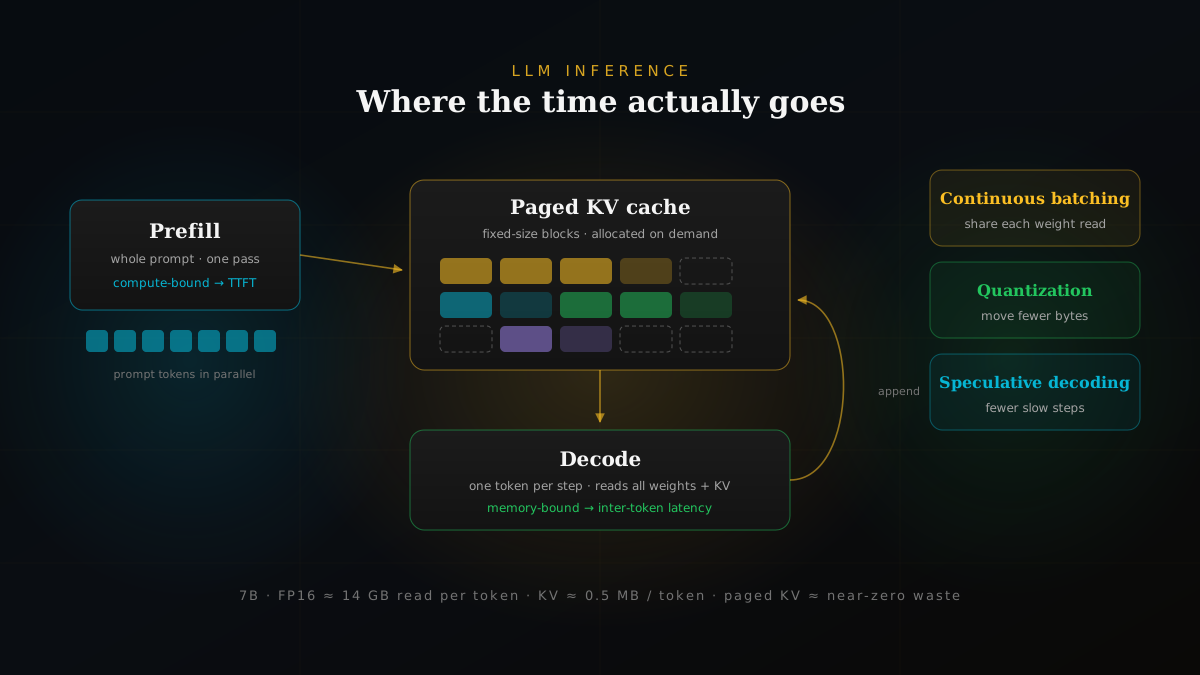
LLM inference runs in two phases. Prefill reads your prompt in one parallel pass and is limited by compute. Decode writes the reply one token at a time and is limited by how fast the GPU can read weights and the KV cache from memory. Nearly every serious speed-up attacks decode: batch more users together (continuous batching), waste less KV memory (PagedAttention), move fewer bytes (quantization, grouped-query attention), or run fewer slow steps (speculative decoding).
Here is a pattern we see a lot. A team gets a model working in a notebook, wraps it in a small API, and ships it. With five internal users it feels fine. Then real traffic shows up, replies start crawling, and the first instinct is to ask for a bigger GPU.
Sometimes that is the right call. More often, the GPU they already have is sitting mostly idle, stuck waiting on memory reads, holding KV cache space that nobody is using, and processing requests in an order that makes short answers wait behind long ones. You can usually get a 2 to 5x improvement before spending anything on hardware, if you understand where the time actually goes.
This post walks through where that time goes and what to do about it, in roughly the order we tackle it on real projects.
Two Phases, Two Different Problems
When you send a prompt to a decoder-only model like Llama, Qwen, or Mistral, the server does two quite different jobs.
Prefill comes first. The model looks at every token in your prompt at the same time, which turns into large matrix multiplications. GPUs love this kind of work. A 2,000-token prompt does not take 2,000 times longer than a one-token prompt; the tokens are processed side by side.
Decode comes next, and this is where things slow down. The model generates the first output token, appends it, generates the next one, and so on. Token 50 cannot start until token 49 exists. Each step is a full pass through the network for a tiny amount of new input.
| Prefill | Decode | |
|---|---|---|
| What it does | Reads the whole prompt in one pass | Produces one new token per step |
| Parallelism | High: every prompt token at once | Low: each token waits on the last |
| Bottleneck | GPU compute (matrix math) | Memory bandwidth |
| Shows up as | Time to first token | Time between tokens |
| Main levers | Chunked prefill, prefix caching | Batching, quantization, speculation |
Once you see the split, a lot of confusing behaviour makes sense. Long prompts hurt the wait before anything appears. Long answers hurt total response time. They are different knobs, and they need different fixes.
Why Decode Is Memory-Bound
Take a 7-billion-parameter model stored in 16-bit precision. That is about 14 GB of weights. To generate a single token, the GPU has to read essentially all of those weights from its high-bandwidth memory into the compute units.
A data-center GPU in the A100 class moves roughly 2 TB of data per second. Do the division and you get about 7 milliseconds per token just to read the weights once, before any clever tricks, and no matter how many teraflops the card advertises. The arithmetic itself is cheap. The reading is not.
At batch size one, a modern GPU spends most of its decode time moving bytes, not doing math.
This is the single most useful mental model for inference work. If you remember nothing else, remember that decode speed is mostly a function of bytes moved per token. Every technique below either shares those bytes across more users, shrinks them, or reduces how many times you have to move them.
The KV Cache: Where Your Memory Actually Goes
Attention needs the key and value vectors of every earlier token. Recomputing them at each step would be absurdly wasteful, so the server keeps them in GPU memory. That is the KV cache, and it grows with every token of every active request.
A rough way to size it:
KV bytes per token =
  2 (key + value) × layers × kv_heads × head_dim × bytes_per_value

Llama 2 7B, FP16:
  2 × 32 × 32 × 128 × 2 bytes  ≈ 0.5 MB per token
  × 4,096 tokens               ≈ 2 GB per sequence
  × 16 concurrent users         ≈ 32 GB of KV cache
Look at that last line. Sixteen users with long contexts need more memory for their KV cache than the model weights themselves. On most production setups, the KV cache, not the model, is what decides how many people you can serve at once.
Shrinking it at the architecture level
Newer models fight this directly. Multi-query attention (MQA) lets all attention heads share one set of keys and values. Grouped-query attention (GQA) is the middle ground most current open models use: small groups of heads share KV. Llama 3 8B, for example, has 8 KV heads instead of 32, which cuts KV memory by four times compared with the older formula above. When you pick a model for serving, the number of KV heads is worth checking alongside the parameter count.
FlashAttention tackles a related problem. It restructures the attention computation into tiles that fit in the GPU's fast on-chip memory, so the large intermediate attention matrix is never written out to slower memory. Same result, far less memory traffic. Most serving engines use it or something like it by default now.
Batching: Sharing the Cost of Reading Weights
If reading the weights is the expensive part, the obvious move is to read them once and use them for many requests. That is batching. Process 32 sequences in one decode step and you pay the weight-reading cost once instead of 32 times.
The naive version, static batching, groups requests and runs them together until the whole group is done. The problem is that answers have wildly different lengths. A 20-token reply finishes early and then its slot sits empty while a 900-token reply keeps going. New requests wait in the queue the entire time.
Continuous batching (also called in-flight batching) fixes this by making scheduling decisions at every decode step. The moment a sequence finishes, it leaves, and a waiting request takes its place. The GPU stays busy, and short requests stop paying for long ones. We treat this as a baseline requirement. If your serving stack does not do it, that is the first thing to change.
PagedAttention and vLLM
Continuous batching created a new headache. If requests come and go every step, how do you manage their KV caches? Earlier systems reserved one contiguous chunk of memory per request, sized for the maximum possible output length. Most requests never got close to that maximum, so most of the reserved space went unused.
In practice, a large share of KV cache memory in those older setups never held a single token. It was lost to over-reservation and fragmentation, and that lost space translated directly into fewer users per GPU.
PagedAttention fixes this by borrowing an old idea from operating systems. Split the KV cache into small, fixed-size blocks, and keep a table that maps each sequence's logical positions to whatever physical blocks happen to be free. Blocks are handed out only as tokens are produced, and they do not have to be next to each other. Waste drops to the last, partly filled block of each sequence.
Request A  →  [blk 7] [blk 2] [blk 9] [blk 4·partial]
Request B  →  [blk 1] [blk 5·partial]
Request C  →  [blk 3] [blk 8] [blk 6·partial]

blocks allocated on demand · no max-length reservation
shared prompt prefix?  point two requests at the same blocks
That last line matters more than it looks. Because blocks are referenced through a table, two requests with the same system prompt can point at the same physical blocks, and only copy them if one of them diverges. The same trick makes parallel sampling and beam search much cheaper.
PagedAttention is the core idea behind vLLM, which has become one of the default open-source choices for serving, with continuous batching, prefix caching, quantized model support, and an OpenAI-compatible API server.
# OpenAI-compatible server in one command
vllm serve Qwen/Qwen2.5-7B-Instruct \
  --max-model-len 8192 \
  --gpu-memory-utilization 0.90 \
  --enable-prefix-caching

# then hit it like any OpenAI endpoint
curl http://localhost:8000/v1/chat/completions \
  -H "Content-Type: application/json" \
  -d '{"model": "Qwen/Qwen2.5-7B-Instruct",
       "messages": [{"role": "user", "content": "Hello"}]}'
Two of those flags are worth understanding rather than copying. --max-model-len caps context length; set it to what your app actually needs, because a huge value reduces how many sequences fit. --gpu-memory-utilization controls how much of the card vLLM claims, and everything left after the weights becomes KV cache. Flags change between releases, so check the docs for the version you install.
Quantization: Moving Fewer Bytes
Back to the core rule: decode speed tracks bytes moved per token. Quantization attacks that directly by storing numbers with fewer bits. Weights in 8-bit take half the space of 16-bit weights, so each decode step reads half as much.
- 8-bit (INT8 or FP8): close to lossless for most current models, and on recent data-center GPUs FP8 is natively supported. Usually the first quantization step we try.
- 4-bit (AWQ, GPTQ and similar): roughly a quarter of the original size. This is how a 70B model ends up on far fewer GPUs. The trade-off is more noticeable, so test it.
- KV cache quantization: storing the cache in 8 bits instead of 16 roughly doubles how many tokens you can keep in memory, which helps long-context and high-concurrency workloads.
Our honest advice: do not trust a general benchmark to tell you whether a quantized model is good enough. Run your own eval set. Quality drops tend to hide in the places generic leaderboards skip, such as multi-step reasoning, structured output, code, and languages other than English.
Speculative Decoding: Guess Ahead, Check in Bulk
Batching helps total throughput, but it does not make any single user's answer arrive faster. For that, you want to cut the number of slow sequential steps. Speculative decoding does exactly that.
The idea is pleasantly simple. A much smaller draft model, which is cheap to run, guesses the next few tokens. The big model then checks all of those guesses in one forward pass, which costs about the same as generating a single token, since decode is memory-bound anyway. It keeps the guesses it agrees with, fixes the first one it does not, and the cycle repeats.
draft model    →  "the"  "cat"  "sat"  "on"  "a"
target model   →  ✓      ✓      ✓      ✓     ✗ → "the"
result         →  5 tokens from 1 big-model pass
The clever part is the acceptance rule. Draft tokens are accepted or rejected in a way that keeps the final output on exactly the same distribution as the large model running on its own. No approximation, no quality loss. On the right workloads that works out to 2 to 3 times faster generation with identical outputs.
How much you gain depends on how often the draft model guesses right. Predictable text such as code, structured data, or answers that quote the prompt sees big wins. Creative writing at high temperature, less so. And because verification adds work, speculative decoding helps most when the GPU has spare capacity, which means low to moderate batch sizes.
Trying it in Transformers
Transformers calls this assisted generation, and you enable it by passing a second model to generate(). The draft model must share the main model's tokenizer, so a small sibling from the same family is the easy choice:
from transformers import AutoModelForCausalLM, AutoTokenizer

tok = AutoTokenizer.from_pretrained("Qwen/Qwen2.5-7B-Instruct")
model = AutoModelForCausalLM.from_pretrained(
    "Qwen/Qwen2.5-7B-Instruct", torch_dtype="auto", device_map="auto")
draft = AutoModelForCausalLM.from_pretrained(
    "Qwen/Qwen2.5-0.5B-Instruct", torch_dtype="auto", device_map="auto")

inputs = tok("Explain the KV cache in two sentences.",
             return_tensors="pt").to(model.device)

out = model.generate(**inputs,
                     assistant_model=draft,
                     max_new_tokens=200)
print(tok.decode(out[0], skip_special_tokens=True))
A related trick, prompt lookup decoding, skips the draft model entirely and guesses by copying n-grams from the prompt. It is surprisingly effective for summarisation and document Q&A, where answers reuse the input text.
Decoding Settings Cost Something Too
It is easy to forget that the way you generate text has a price. The main decoding strategies each cost something different:
- Greedy and sampling keep one sequence per request. Cheapest.
- Beam search keeps several candidate sequences alive. Four beams means roughly four times the KV cache and decode work. Rarely worth it for chat, sometimes worth it for translation.
- max_new_tokens is a cost control, not just a safety net. Unbounded outputs are the most common source of runaway latency we see.
When One GPU Is Not Enough
Some models simply do not fit on one card. Tensor parallelism splits each layer's matrices across several GPUs that work on every token together. It cuts per-token latency, but the GPUs need to talk constantly, so it really wants fast links like NVLink inside a single server. Pipeline parallelism gives each GPU a slice of the layers instead. It needs less communication, but you need enough requests in flight to keep every stage busy.
A practical note: before reaching for multiple GPUs, see whether a quantized version of the model fits on one. A single card with no interconnect overhead is simpler to run and frequently cheaper.
Measure the Right Things
None of this is useful if you cannot tell whether it worked. These are the four numbers we put on every inference dashboard:
- Time to first token (TTFT): how long the user stares at nothing. Driven by queueing and prefill.
- Inter-token latency: how smoothly the reply streams. Driven by decode and batch size.
- Throughput: total output tokens per second across all users. This is what pays the GPU bill.
- Cost per million tokens: the number finance will eventually ask you about.
Watch p95 and p99, not averages. And accept up front that latency and throughput pull against each other: bigger batches serve more people but make each person wait a bit longer per token. The right balance depends on your product. A coding assistant and an overnight document-processing job want very different settings. If you are building out monitoring, our post on AI observability for production teams covers the wider picture.
Which Lever to Pull First
| Technique | Mainly improves | Effort |
|---|---|---|
| Continuous batching | Throughput | Low (built into vLLM, TGI, TensorRT-LLM) |
| Paged KV cache | Throughput, max concurrency | Low if you use an engine that has it |
| Prefix caching | TTFT on repeated prompts | Low, one flag |
| FP8 / INT8 weights | Latency, memory, cost | Medium, needs an eval pass |
| 4-bit weights | Memory, cost | Medium to high, check quality carefully |
| KV cache quantization | Concurrency, long context | Medium |
| Speculative decoding | Per-user latency | Medium, needs a good draft model |
| Tensor parallelism | Fitting big models, latency | High, needs fast GPU interconnect |
If we were walking into a slow deployment tomorrow, this is the order we would go in:
- Measure first. Get TTFT, inter-token latency and throughput at p50 and p95 under realistic traffic. Guessing wastes weeks.
- Move to a real serving engine. If you are serving from a hand-rolled loop around
generate(), switching to vLLM or something similar is usually the biggest single win. - Turn on prefix caching if your requests share a long system prompt or RAG template. Many do.
- Right-size context length. Do not reserve 128K tokens of room for a product that never goes past 8K.
- Try FP8 or INT8 weights and check quality on your own evals.
- Add speculative decoding if per-user latency still matters more than raw throughput.
- Only then think about more GPUs.
Final Takeaway
LLM inference looks like a compute problem and mostly behaves like a memory problem. Once that clicks, the toolbox stops looking like a random list of tricks. Batching shares the bytes you read. PagedAttention stops you wasting the memory you have. Quantization and GQA shrink the bytes. Speculative decoding reduces how many times you have to read them at all.
None of these require a research team. Most are a configuration change in a mature open-source engine, plus the discipline to measure before and after. For a broader look at the stack around the model, see AI infrastructure for businesses in 2026.
Frequently Asked Questions
What is LLM inference?
Inference is the part where a trained model is actually used: it takes a prompt and produces output tokens. For a decoder-only LLM that happens in two phases. Prefill reads the whole prompt in one parallel pass, and decode then generates the answer one token at a time, with each new token depending on the ones before it.
Why is LLM inference slow?
Mostly because of the decode phase. To produce each token, the GPU has to stream the full set of model weights (and the KV cache) out of memory, but it only does a small amount of math per byte it reads. So at small batch sizes the chip spends most of its time waiting on memory bandwidth, not computing.
What is the KV cache?
During generation, the attention layers need the key and value vectors of every previous token. Instead of recomputing them at every step, the server stores them in GPU memory. That store is the KV cache. It grows linearly with sequence length and batch size, and on long-context workloads it often takes more memory than the model weights.
What is continuous batching?
Static batching waits for every request in a batch to finish before starting new ones, so short replies sit idle behind long ones. Continuous (or in-flight) batching schedules work at the level of individual decode steps: finished sequences leave the batch and queued ones join immediately. It is the default in modern serving engines like vLLM and TensorRT-LLM.
What does PagedAttention do?
PagedAttention, introduced with vLLM, stores the KV cache in small fixed-size blocks that do not need to sit next to each other in memory, similar to virtual memory pages in an operating system. That removes most of the fragmentation and over-reservation that older systems suffered from, so more requests fit on the same GPU. In practice that often means several times more throughput on the same hardware.
How does speculative decoding work?
A small, fast draft model guesses the next several tokens. The large target model then checks all of those guesses in a single forward pass and keeps the ones it agrees with. Thanks to a careful acceptance rule, the output distribution is exactly the same as running the large model alone, just with fewer slow steps. On predictable text, 2 to 3 times faster generation is common.
Does quantization hurt model quality?
It can, but usually less than people fear. 8-bit weights (INT8 or FP8) are close to lossless for most modern models. 4-bit methods save more memory and bandwidth but deserve a proper evaluation on your own tasks, because small regressions tend to show up in reasoning, code, and non-English text first.
Which metrics should I track for LLM serving?
Time to first token (driven mainly by prefill and queueing), inter-token latency or time per output token (driven by decode), total throughput in tokens per second across all users, and cost per million tokens. Always look at percentiles such as p50 and p95, not just averages.
Should I use vLLM or plain Transformers for serving?
Transformers and its generate() method are great for experiments, evaluation, and research code. For a production API with many concurrent users, a dedicated serving engine such as vLLM is usually the better fit, because it adds continuous batching, paged KV cache management, prefix caching, and an OpenAI-compatible server out of the box.
Faster, Cheaper Inference
Paying for GPUs that spend their time waiting?
At Invisigent, we profile LLM serving stacks, find where latency and cost actually come from, and tune batching, caching, quantization and hardware to fit your workload.
Talk to Us About Inference Optimization →