
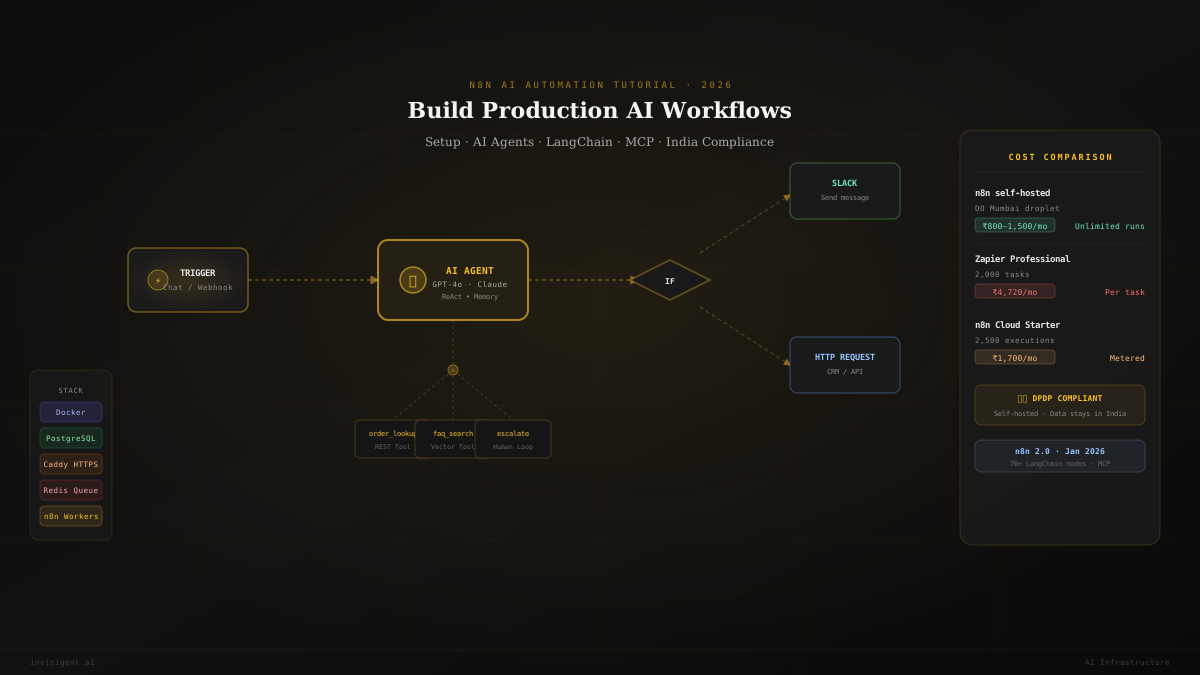
n8n AI Automation Tutorial: Complete Workflow Setup Guide (2026)
From Docker self-hosting to production AI agents, everything technical founders and developers need to run n8n in 2026, including DPDP-compliant setup for Indian teams.
What is n8n
Open-source workflow automation with AI built in
n8n (pronounced “nodemation”) is an open-source workflow automation tool. It connects apps, moves data between them, and automates repetitive tasks without much code.
Instead of manually copying leads from a form into your CRM, writing follow-up emails, and updating a spreadsheet, n8n does all of that automatically — every time, the moment a form is submitted.
What changed in 2026 is AI. You can drop an AI agent powered by GPT-4o, Claude, or Gemini directly inside a workflow. The agent reads context, makes decisions, calls APIs, and writes responses. This isn't a bolt-on summarizer. AI is part of the automation itself.
n8n 2.0 launched in January 2026 with native LangChain integration, 70 AI-dedicated nodes, sandboxed code execution, persistent agent memory, and native MCP support.
Why n8n in 2026
Cost and capability both changed at once
Two things shifted n8n's trajectory. n8n 2.0 moved it from “developer-friendly Zapier clone” to a real AI orchestration engine. The other was cost.
Zapier charges per task, and every action in a workflow counts separately. A 10-step workflow running 1,000 times a month burns through 10,000 tasks. A self-hosted n8n instance running the same volume on an ₹800/month VPS still costs ₹800/month — no execution limits, no per-task charges, same software.
Zapier Professional runs roughly ₹4,720/month with GST for 2,000 tasks. A self-hosted n8n on a basic DigitalOcean droplet handles most startup automation at ₹800–1,500/month total. Past 10,000 runs a month, the economics aren't close.
Tool Comparison
n8n vs Zapier vs Make: which one should you pick?
| n8n | Zapier | Make | |
|---|---|---|---|
| Best for | Developers, technical founders | Non-technical teams | Mid-complexity visual |
| AI capability | 70+ LangChain nodes | Basic (Agents, Copilot) | Maia builder (beta) |
| Self-hosting | Yes, fully free | No | No |
| Cost at scale | ~₹1,500/mo self-hosted | ₹15,000–1,00,000+/mo | ₹3,000–8,000/mo |
| Data in India | Yes (if self-hosted) | No | No |
| Custom code | JavaScript + Python | No | Limited |
If you're a non-technical team running simple tasks across standard SaaS tools, Zapier wins on ease. For developer-led teams doing AI-heavy work at volume, or with data residency requirements, n8n is the one to use.
Part 1: Getting Started
Installing n8n: two options
Option A: n8n Cloud. Go to n8n.io, sign up, and you get a managed instance. There's a 14-day free trial. Starter is about ₹1,700/month for 2,500 executions. Good for testing. Expensive for production.
Option B: Self-hosting with Docker. Recommended. You need a Linux server. For Indian founders: DigitalOcean basic droplet (₹800–1,500/month), Hetzner Cloud (cheaper but Europe), or AWS Mumbai ap-south-1 (pricier, keeps data in India). Minimum: 2 vCPU and 4 GB RAM.
docker-compose.yml (core config)
services:
  postgres:
    image: postgres:16
    restart: unless-stopped
    environment:
      POSTGRES_USER: n8n
      POSTGRES_PASSWORD: change_this_password
      POSTGRES_DB: n8n
  n8n:
    image: docker.n8n.io/n8nio/n8n
    restart: unless-stopped
    ports:
      - "5678:5678"
    environment:
      - DB_TYPE=postgresdb
      - DB_POSTGRESDB_HOST=postgres
      - N8N_ENCRYPTION_KEY=a_random_32_char_key
      - EXECUTIONS_DATA_MAX_AGE=168
      - N8N_EDITOR_BASE_URL=https://n8n.yourdomain.com
Two things worth flagging: use PostgreSQL from day one — migrating from the default SQLite later is painful. And set EXECUTIONS_DATA_MAX_AGE=168 (7 days) so execution logs don't balloon.
Add Caddy as a reverse proxy for automatic HTTPS certificates. Don't expose port 5678 directly to the internet.
Part 2: First Workflow
Gmail to AI summary to Slack in 5 nodes
The fastest way to understand n8n is to build something real. This workflow watches Gmail for new emails, summarizes them with AI, and posts the summary to Slack. It covers the three building blocks behind most n8n workflows: a trigger, a transformation, and an action.
- Gmail Trigger. Connect via OAuth2, set event to “New Email Received,” poll every 5 minutes.
- OpenAI node. Resource: Chat, Model: gpt-4o. Prompt: “Summarize this email in exactly 3 bullet points. Focus on what action is required, who it's from, and any deadline mentioned. Subject:
{{ $json.subject }}” - Slack node. Connect your workspace, operation: Send message, channel: #email-summaries.
- Test it. Click “Test Workflow.” n8n pulls a real email, runs OpenAI, posts to Slack. You see data flowing through each node in the execution panel.
- Activate. It runs automatically in the background.
The {{ $json.field }} syntax is how n8n passes data between nodes. The Gmail trigger outputs the email as JSON, and this expression pulls specific fields into your prompt. Once that clicks, the rest of the system makes sense.
Part 3: How n8n Works
The node types that matter
Trigger nodes start a workflow. They listen for something — a new email, a webhook call, a schedule, an incoming chat message.
Action nodes connect to external services — Google Sheets, Slack, Razorpay, HubSpot, Notion. n8n ships with 500+ built-in integrations. The HTTP Request node covers anything not natively supported.
The AI Agent node is the most powerful primitive in 2026. It's not a simple GPT wrapper; it's an orchestration layer connecting an LLM to a set of tools. The agent reads input, decides which tool to call, calls it, reads the result, reasons about what to do next, and loops until it has enough to respond. This is the ReAct (reason and act) pattern as a visual node.
AI Agent sub-nodes
Part 4: Building an AI Agent
Customer support agent with tools, memory, and escalation
We're building a customer support agent that looks up orders, answers FAQs, and escalates to a human when it can't resolve something. This covers the full AI Agent pattern.
Step 1: Add a Chat Trigger. It creates a built-in interface for testing and generates a sessionId for multi-turn conversations.
Step 2: Add an AI Agent node with a system prompt defining the agent's rules — which tools it has, when to escalate, how concise to be, and critically: never make up data it doesn't have.
Step 3: Attach an OpenAI Chat Model sub-node. Use gpt-4o for complex queries and gpt-4o-mini for simple FAQ lookups (more on routing below).
Step 4: Memory. Use Postgres Chat Memory for production, connected to your PostgreSQL instance with the session key set to {{ $('Chat Trigger').item.json.sessionId }}. Simple Memory (RAM) is lost on every restart.
Step 5: Tools. Add HTTP Request nodes as tools. The key syntax is $fromAI('identifier', 'the order ID or customer email'). This tells the agent what data to extract and pass at runtime — the agent fills in these values based on its own reasoning.
Step 6: Add an IF node after the agent to catch escalation intent and route true to a Slack notification for your support team. Every tool call and result is visible in the execution log — one of n8n's biggest practical advantages over a custom-coded agent pipeline.
Part 5: Production Patterns
Three workflow patterns that work at scale
Pattern 1
LLM routing by query complexity
GPT-4o costs roughly 15× more than GPT-4o-mini per token. Add a classification step before the agent: a prompt that classifies each query as SIMPLE (order status, tracking, basic FAQ) or COMPLEX (complaints, refunds, billing disputes). Then route each to a different AI Agent node with the appropriate model. This alone typically cuts LLM costs by 60–70% on mixed-intent workflows.
Pattern 2
Confidence gate before irreversible actions
Don't let an AI agent take irreversible actions — sending emails, updating financial records, deleting data — without a confidence check. Add to the agent's system prompt: "Before any irreversible action, output a JSON block with action, confidence (0–100), and reasoning. Proceed only if confidence is 80 or above." Then an IF node routes low-confidence cases to a human review channel.
Pattern 3
Retry with exponential backoff
External APIs fail. Use the built-in "Continue on Error" toggle on HTTP nodes combined with a Code node implementing exponential backoff: 1s, 2s, 4s across 3 attempts. This is table-stakes reliability engineering for any workflow calling third-party APIs at volume.
Part 6: Indian Startups
Data residency and DPDP compliance
Most global n8n tutorials skip this entirely. If you're building in India — fintech, healthtech, edtech, SaaS — data residency isn't optional. The Digital Personal Data Protection (DPDP) Act 2023, with rules notified in November 2025, applies to any organization processing digital personal data of Indian citizens. Full compliance obligations land by May 2027. The Consent Manager Framework becomes operational by November 2026.
Zapier and Make store your workflow data on servers in the US or EU. Every customer record, API response, and email payload running through Zapier leaves India. Self-hosted n8n on Indian infrastructure keeps data in India — AWS Mumbai (ap-south-1), a DigitalOcean Bangalore droplet, or a managed Indian provider.
| Option | Monthly cost (INR) | Executions | Data in India |
|---|---|---|---|
| Zapier Professional | ~₹4,720 | 2,000 tasks | No |
| n8n Cloud Starter | ~₹1,700 | 2,500 executions | No |
| n8n self-hosted (DO droplet) | ~₹800–1,500 | Unlimited | Yes |
| n8n managed (CloudMinister India) | ~₹1,400 | Unlimited | Yes |
For fintech and healthtech handling Aadhaar data, PAN, bank statements, or health records, data residency makes self-hosted n8n the only option that holds up under DPDP regardless of volume.
Part 7: MCP Integration
What changed in May 2026
MCP (Model Context Protocol) is an open standard letting AI agents connect to external services through a standardized interface. n8n shipped native MCP support in May 2026.
Before this, connecting an agent to Notion, Linear, or Monday.com meant manually configuring an MCP Client node with credentials, endpoint URLs, and auth flows. Now you pick the service from the nodes panel, authenticate once, and it's available as a tool.
Current native MCP coverage includes Apify, Linear, Monday.com, Notion, and PostHog, with more being added continuously. If an agent needs to create Notion pages, update Linear issues, or read PostHog analytics, that's a two-minute addition now — no HTTP node configuration needed.
Part 8: Scaling
When you outgrow a single process
By default, n8n runs all workflow executions in a single process. Under concurrent load — multiple workflows triggering at once, long-running AI agent calls — this becomes a bottleneck.
The fix is queue mode with Redis. It separates the main process (UI and API) from worker processes, which scale horizontally. Add Redis to your docker-compose.yml, set EXECUTIONS_MODE=queue on both the main instance and worker containers, and add more worker replicas as needed — each pulls jobs from the Redis queue independently.
Part 9: Limits
What n8n won't solve for you
n8n is workflow orchestration. It handles triggers, data flow, API calls, and LLM invocation. Here's what it doesn't handle.
Model-level observability
You won't know which prompt versions perform better, where latency spikes, or why an agent gave a wrong answer without a separate observability layer. Tools like LangFuse or Helicone sit alongside n8n for this.
Vector database management
n8n can call a vector DB as a tool, but building, chunking, embedding, and maintaining the knowledge base is separate infrastructure.
Workflow governance
Who approved this workflow? What data does it touch? n8n doesn't answer these. Build a workflow registry — even a Notion doc — before you have 50 active workflows.
Agent reliability engineering
The confidence gates, fallback chains, and circuit breakers from Part 5 aren't automatic. n8n gives you the primitives. The architecture is your job.
Teams that struggle with n8n in production usually treated it as a magic box. The ones that succeed treat it like any other production infrastructure: documentation, error handling, monitoring, clear ownership.
FAQ
n8n questions from Indian founders and technical teams
Is n8n really free? What's the catch?
The Community Edition is permanently free to self-host. You pay for the server — around ₹800–1,500/month on a DigitalOcean droplet — nothing goes to n8n itself. The hosted Cloud version is paid, starting around ₹1,700/month, and there's no permanent free cloud tier as of 2026. If you're comfortable with Docker, self-hosting is almost always the better deal.
Can Indian fintech and healthtech startups use n8n without violating DPDP?
Yes, if you self-host on Indian infrastructure. n8n Cloud routes data through European servers, which can conflict with data residency requirements under the DPDP Act. Self-hosted n8n on AWS Mumbai (ap-south-1), DigitalOcean Bangalore, or a managed Indian provider like CloudMinister keeps all automation data within India. You control the encryption keys, the log retention policy, and access, which maps cleanly onto DPDP's data fiduciary obligations.
How much does it cost to run AI workflows on n8n at scale?
The n8n infrastructure cost stays flat — it's just your VPS. What scales is your LLM API spend. At 10,000 workflow runs a month, each calling GPT-4o-mini for a short task (around 500 tokens in, 200 out), expect roughly $8–12 in OpenAI costs. GPT-4o for the same volume runs about $80–120. That gap is why LLM routing matters — using cheaper models for simpler queries can cut LLM costs 60–70% on mixed-intent workloads.
Is n8n production-ready, or still a developer toy?
n8n 2.0 (January 2026) is production-ready for most use cases. Task Runners sandbox code execution, the PostgreSQL backend is stable, and RBAC, SSO, audit logs, and encrypted credentials are all present. The caveats: model-level observability needs a separate tool, and workflow governance is on you.
n8n vs Zapier: which is better for an early-stage Indian startup?
Depends on your team. With zero technical co-founder and a need for automation live in hours for basic tasks, Zapier is faster to start. With at least one developer, expected growth past 5,000 runs a month, customer data that needs to stay in India, or plans to build AI agents, n8n is the better long-term call. Migrating from Zapier to n8n takes 4–6 weeks for a non-trivial stack, so it's worth starting right.
What's the difference between n8n's AI Agent node and a Basic LLM Chain?
LLM Chain: input goes in, the model generates output, the workflow continues. One call, no decisions. AI Agent: input goes in, the model reasons about what to do, picks a tool, calls it, reads the result, reasons again, maybe calls another tool, and eventually composes a final response. Use an LLM Chain when you know exactly what transformation you need. Use an AI Agent when the right action depends on information the model has to retrieve first.
Can n8n connect to Indian services like Razorpay or Shiprocket?
n8n has 500+ built-in integrations but no native nodes for Razorpay or Shiprocket as of mid-2026. Both have well-documented REST APIs, and the HTTP Request node connects to any REST API — it takes about 15 minutes to build a Razorpay webhook workflow that triggers on payment success and updates your CRM. Zoho has a native n8n node.
n8n AI Infrastructure for Indian Teams
Build AI Automation That Stays in India.
We design and deploy production n8n AI automation stacks — self-hosted on Indian infrastructure, DPDP-compliant, with AI agents, observability, and governance built in from day one. Invisigent works with a limited number of teams each quarter.
Book a Free AI Infrastructure Audit →